Data Connectors Guide
This guide explains how data connectors work in Strand in plain language.
The Big Picture
In Strand, connectors can work with three different kinds of data:
- Account data: company/account records (for example name, domain, owner, segment).
- Contact data: people/user records linked to accounts (for example email, name, phone, role).
- Event data: activity records over time (for example sign in, feature used, subscription changed).
A connector can support one type, multiple types, or only specific parts of each type.
Account Data (What it does)
Account sync creates or updates account records in Strand.
Common account-source connectors:
- HubSpot
- Stripe
- Custom API (any REST endpoint)
- BigQuery query sync
- Snowflake query sync
How account data is processed
- Connector reads source data.
- Field mappings translate source columns/properties into Strand fields.
- Strand matches incoming rows to existing accounts.
- Strand creates new accounts or updates existing ones.
Whether new accounts are created depends on the connector setting:
Create new accounts when no match is found= on: Strand can create and update.Create new accounts when no match is found= off: Strand only updates existing matched accounts.
Matching strategies
You can choose how Strand identifies the correct account:
Domain: match bycompanyDomain.External ID: match byexternalCustomerId.Domain + External ID: allow either.
Strand fields vs custom fields
- Some fields are built-in model fields (for example
companyName,companyDomain,externalCustomerId,accountOwnerId). - Additional mapped fields are automatically created and saved as custom fields.
Tracked Fields in Settings
After fields are detected by sync, you can manage them in Settings -> Data Management (/app/settings/data-sync) under Tracked Fields.
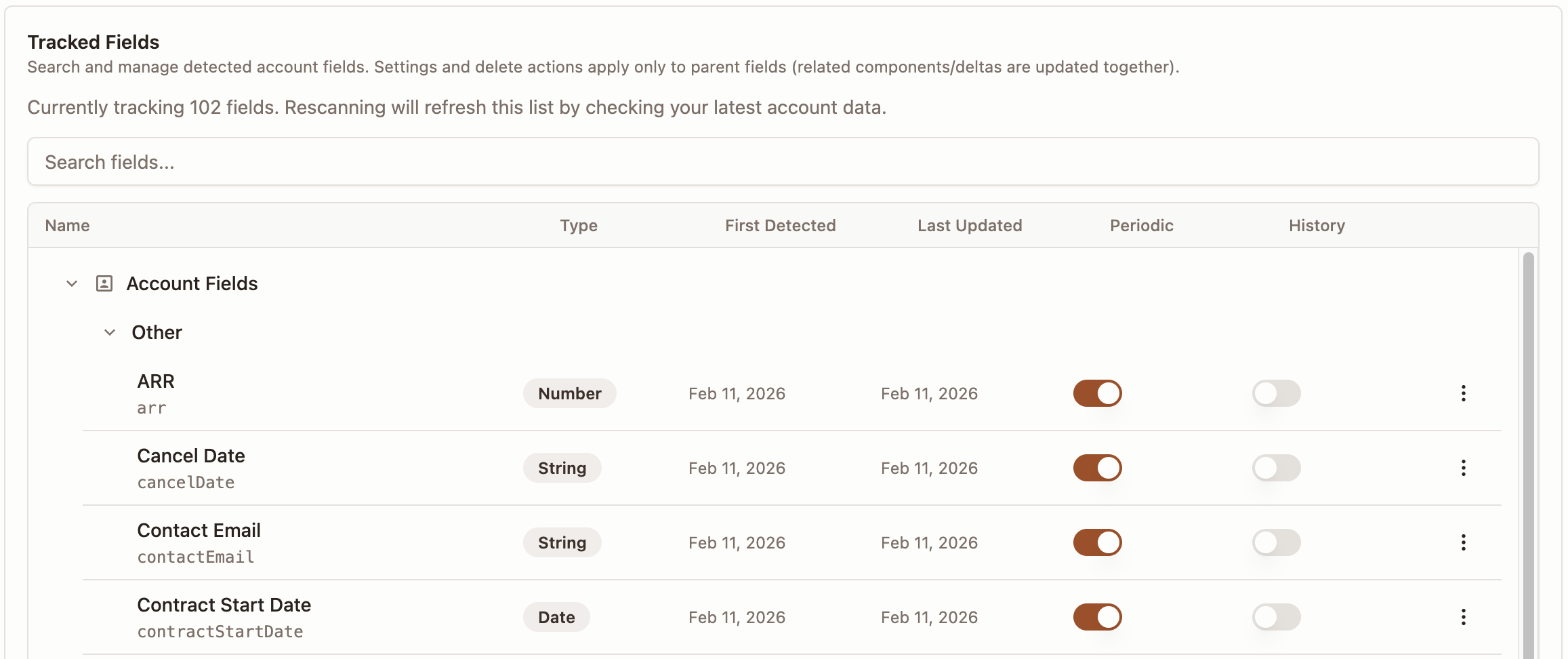
Each field has two important controls:
Periodic: include or exclude that field from automatic periodic sync updates.History: decide whether changes are kept as a timeline.
What this means in practice:
- If
Periodicis off, scheduled syncs do not update that field. - If
Historyis on, each change is saved as a new historical record. - If
Historyis off, Strand keeps the latest value without storing every change point.
Reserved and special fields
Strand has sync-only ingest fields that are used during sync logic and are not stored as normal custom fields.
accountOwnerEmail- Purpose: map the account owner by matching an organization member email.
- Behavior: Strand looks up the member by email and links that person as account owner.
- If no member matches, sync continues and owner assignment is skipped.
contactEmail- Purpose: create or update the primary synced contact for an account.
- Behavior: creates/updates a
Contactrecord withemail,source: "sync", andisPrimary: trueon create.
endUsers- Purpose: create or update additional synced contacts for an account.
- Behavior: accepts a list of emails or a comma-separated string (for example
a@company.com, b@company.com) and creates/updatesContactrows withsource: "sync"andisPrimary: falseon create.
Sync modes
- Periodic sync: runs automatically on a schedule.
- Manual sync: runs when a user clicks sync now.
Both modes support incremental sync when available.
Incremental sync
Some connectors support incremental sync, meaning Strand only fetches records that changed since the last successful sync instead of pulling everything again.
How it works:
- After a successful sync, Strand saves the timestamp of when the sync started.
- On the next run, only records modified after that timestamp are fetched.
- If a sync fails (partially or fully), the timestamp is not advanced, so the next run retries the same window.
Connector support:
- BigQuery / Snowflake: opt-in. Use the
$LAST_SYNC_TIMESTAMPvariable in your SQL query to filter by last sync time. Queries without this variable continue to do full sync. - HubSpot: automatic. When a previous successful sync exists, Strand filters by
hs_lastmodifieddateso only recently changed companies are fetched. - Custom API: opt-in. Configure a timestamp query parameter (for example
updated_since) and Strand passes the last sync time automatically. - Stripe: always full sync. Stripe’s API does not support filtering by last modified date.
Important:
- For HubSpot, Custom API, and query-based connectors (BigQuery/Snowflake), changes to sync configuration can reset the incremental baseline. After major mapping/filter/query changes, expect the next sync to behave like a fresh run.
Contact Data (What it does)
Contact sync creates or updates contact (person/user) records in Strand and links them to existing accounts.
Common contact-source connectors:
- Custom API (any REST endpoint)
- BigQuery query sync
- Snowflake query sync
- HubSpot
How contact data is processed
- Connector reads source data (API response or query results).
- Field mappings translate source columns/properties into contact fields.
- Strand matches each contact to an existing account using the configured account matching field.
- Strand creates a new contact or updates an existing one (matched by email within each account).
- Contacts that cannot be matched to an existing account are skipped.
Contact fields
| Field | Required | Description |
|---|---|---|
| Yes | Contact email address (unique per account) | |
| Name | No | Full name of the contact |
| Phone | No | Phone number |
| Role | No | Job title or role (for example CTO, Admin User) |
An account match field is also required to link the contact to an account:
companyDomain: match by company domain.externalCustomerId: match by external customer ID.
Contact sync vs account sync ingest fields
Account sync also supports contactEmail and endUsers as special ingest fields that create contacts during account sync. Contact sync is a separate, dedicated sync for pulling contacts from a standalone endpoint or query. Both approaches result in the same contact records in Strand.
Event Data (What it does)
Event setup does not create/update account records.
Instead, it defines how Strand reads events and links events back to accounts when needed.
Common event-source connectors:
- BigQuery
- Snowflake
- PostHog
- Custom API (any REST endpoint)
How event data is processed
- You configure an event schema (time, event name, user id, account/domain source, properties).
- Strand queries events from the connector using that schema.
- Strand prepares event data in a common structure, making it usable for reporting and account-level insights
How events link to accounts
Event configuration chooses how to identify the account:
- by domain, or
- by external ID.
This must align with the identifier available in your event source.
Event schema special cases
- For warehouses, you can map event properties with direct columns or expressions.
- Expressions are useful for nested extraction and type conversion.
- In BigQuery, event storage may be:
- single table, or
- one table/view per event.
Key Difference: Account vs Event Data
- Account data changes account records in Strand.
- Event data defines how Strand reads activity data and connects it to accounts.
They are complementary but independent.
Examples:
- Use HubSpot/Stripe for accounts and BigQuery for events.
- Use BigQuery for both accounts and events.
- Use events only (if accounts are managed manually).
Custom API Connector Details
The Custom API connector lets you sync data from any REST endpoint. It supports accounts, contacts, and events through separate endpoint configurations that share a single setup wizard.
Authentication
Three authentication modes are available:
- Bearer token: sends
Authorization: Bearer <token>. - API key: sends the token in a custom header (default
X-API-Key). - None: no authentication header.
Each endpoint (accounts, contacts, events) can optionally use its own auth token. If an endpoint-specific token is not set, the main connector token is used.
Response data path
Many APIs wrap records inside a nested object (for example { "data": { "items": [...] } }). The response data path tells Strand where to find the array of records using dot notation (for example data.items). Leave empty if the API returns a top-level array.
Pagination
Custom API supports three pagination strategies:
- Page-based: increments a page number parameter (for example
?page=1&limit=100). - Offset-based: increments an offset parameter (for example
?offset=0&limit=100). - Cursor-based: follows a next-cursor value from the response (for example
?cursor=abc123).
Configure the parameter names, page size, and optionally a total count path to stop early. Pagination is available for accounts, contacts, and events.
Incremental sync
Configure a timestamp parameter (for example updated_since) and Strand passes the last successful sync time as its value. The upstream API is responsible for filtering records by that timestamp.
Record limits
Account sync defaults to a maximum of 10,000 records per sync run. This can be increased up to 100,000 via the maxRecords configuration. Event queries are capped at 5,000 records per request.
Events: server-side filtering
By default, Strand fetches all events and filters by account client-side. For better performance with high-volume APIs, configure an account ID parameter (for example account_id). Strand passes the account identifier as a query parameter so the upstream API filters server-side.
Nested JSON handling
Strand automatically flattens nested JSON responses up to 3 levels deep using dot notation (for example address.city). Discovered fields are available for mapping in the sync configuration.
Practical Setup Guidance
- Decide your source of truth for account records first.
- Keep account matching strategy consistent across connectors.
- Use clear
camelCaseStrand target fields in account mappings. - Use periodic sync for live systems and manual sync during setup/testing.
- For events, verify account identifier mapping early (domain vs external ID) to avoid missing event-to-account links.
- For Custom API connectors with high event volume, configure the account ID parameter to enable server-side filtering.