Strand AI Agent
What is the Strand AI Agent?
The Strand AI Agent is your assistant for customer success. It connects to your data sources — product analytics, Stripe, CRM, and other integrations — and helps you understand what is happening across your accounts without having to dig through dashboards yourself.
You can ask the agent things like:
- “Which accounts have not logged in for the past 7 days?”
- “Analyze customer activity and suggest ways to reduce churn.”
- “Remind me on Slack if a customer has not completed onboarding within 3 days of signing up.”
The agent works in a chat interface. Describe what you need in plain language and it will query your data, run analysis, and take actions on your behalf — such as creating Recurring Tasks, generating Signals, or posting updates to Slack.
Beyond one-off questions, the agent can also build automations for you. Instead of manually configuring a recurring task, you can describe your goal and the agent will set up the schedule, prompt, and outputs for you.
Giving the agent context
Background instructions
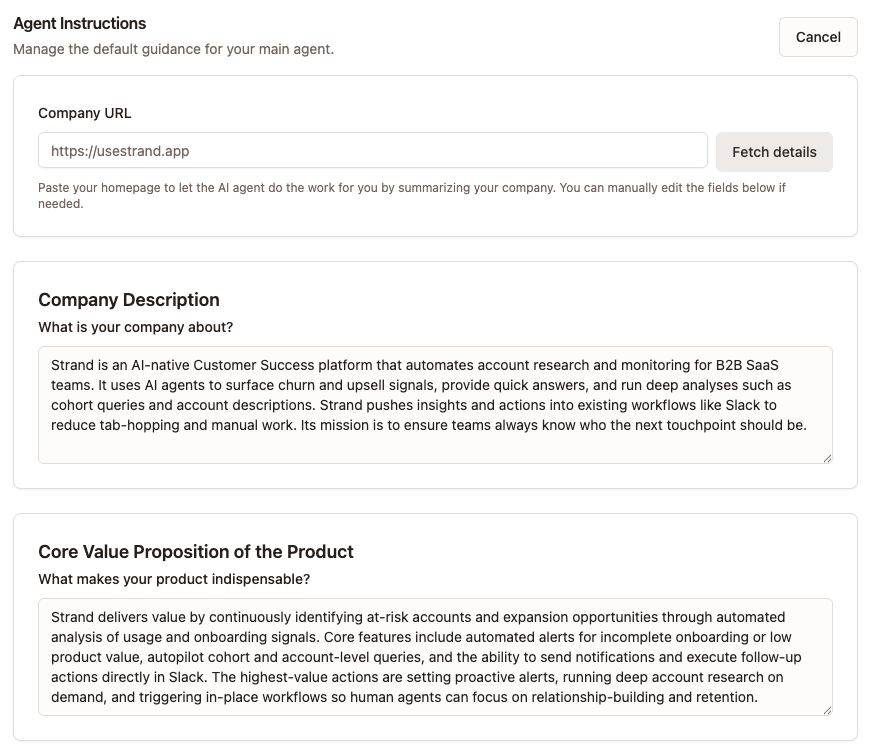
To give the agent better understanding of your company, and the core features of the product, you can add information about your company to Agent Instructions.
You can get started by inserting your company URL, and the agent can research your website to get an understanding of what you do. It’s good to check especially the Core Value Proposition as this can be surface level. You can then add more information about what type of events within your product signal that someone is getting value from using it.
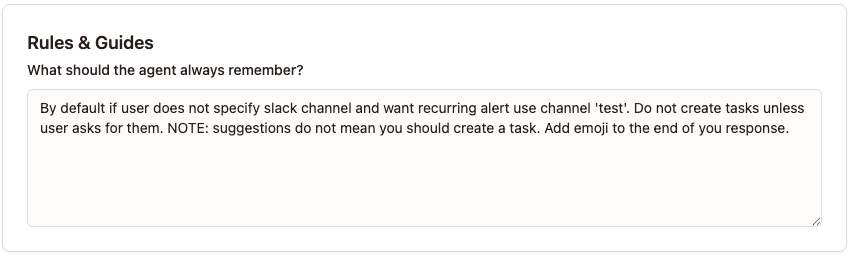
Rules & Guides
Below these two, there is a third text field for Rules & Guides. This is useful for particular formatting you want the agent to always remember. This can be for example to ignore certain events or users within the product (such as internal users).
Troubleshooting
If agent gets stuck
One of the common reasons behind the agent not finding results or bringing bad results can be if the context window gets long. If you are chatting with the agent multiple times, and then the context changes slightly, it can get confused quite easily. In this instance, it is best to start a completely new thread/chat session to continue on a topic.
Checking for hallucinations
Strand is built to only work with data it has retreived from sources like product analytics, Stripe and other connected sources.
You can always do a follow-up questions asking: “Please explain how you arrived at these insights”. Strand should explain its logic behind conclusions, and show a path eg. for which analytics events it bases an opinion on.